Despite me having worked with AWS services for a while, I had never deployed a project from scratch by myself. After studying and passing the AWS Solutions Architect Associate exam I figured it was time that I put all of my knowledge together a deploy my own project from scratch. I had previously created a website, fightdb.org and have it hosted on a VPN (Architecture explanation here). Rather than migrating that over, I decided to host my portfolio site within the AWS ecosystem.
AWS Architecture
Within AWS, there are multiple ways to deploy a static website.
- AWS Amplify
- This method is used for deploying web or mobile apps in a server-less ecosystem.
- Little to no deployment skills required.
- S3
- A “object” storage system that has the ability to host your static files.
- Mainly meant for storing files, but comes with ability to host static sites as well.
- This method requires setting up everything yourself.
Just to be able to see the pros and cons of both, I deployed my app on each one.
There technically are many other ways to host static sites on AWS. But are overkill (and much more expensive) compared to the former options:
- EC2 Instance
- This is overkill for most static sites as it gives you the ability to access a server.
- Is more for dynamic sites and full web apps.
- Elastic Beanstalk
- Even though you technically could host a static site, this would be drastic overkill.
- Elastic Beanstalk is meant for hosting full web apps easily. Giving you an easy setup without having to manage each service individually.
- Elastic Container Service
- This is essentially the AWS version of docker containers.
- They provide a fully managed container service with little management needed
- In the same vain as EC2 Instance, this would require a large amount of setup required for a simple static site.
AWS offers many different options for site hosting, as this feature is the most common need out of a cloud service. I will talk a little of the pros and cons of Amplify and S3 hosting, as these are the two I used for this project. I may make a blog post later on regarding the other services. But for now I will not focus on those.
S3 Static Hosting
S3 itself is just a object storage service that gives you the ablility to store files as “objects” as opposed in file systems.
AWS S3 is, next to the cloud computing aspects of their services (EC2), is one of the most used service within the ecosystem. Their are many different use cases of S3, but today I am just going to focus on the static hosting aspect of it.
How S3 hosting works
When setting up a new S3 bucket, you can have the option to set up “Static website hosting”. This provides a basic set up of linking your “index.html” document (your home page) and AWS then providing a public URL for access to your bucket. (This is not meant as a guide, if looking for one, feel free to follow the AWS official docs for setting up a S3 static site)
To get the most basic set up of a static site up with S3, this is really all you need. But using this method has great security issues (and potential great cost issues on your end) as there is nothing preventing someone from accessing your files directly or preventing DDOS attacks. That is why it is always recommended to put up a CloudFront distribution in front of your S3 static site.
What is CloudFront?
CloudFront is a CDN (Content Delivery Network). A service that allows a setup that, rather than customers connecting directly to your files. Sets up a reverse proxy which is a technology that hides from customers where the files are being served and takes care of serving the files themselves, while also protecting the server from potential malicious attacks.
The following diagram taken from the AWS docs is a breif overview of the solution:
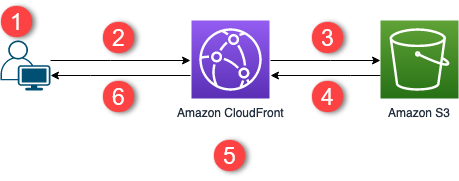
- The viewer requests the website at www.example.com.
- If the requested object is cached, CloudFront returns the object from its cache to the viewer.
- If the object is not in the CloudFront cache, CloudFront requests the object from the origin (an S3 bucket).
- S3 returns the object to CloudFront.
- CloudFront caches the object.
- The objects is returned to the viewer. Subsequent requests for the object that come to the same CloudFront edge location are served from the CloudFront cache.
S3 & CloudFront Pricing
For a basic static hosting site using this method, you will be paying next to nothing. For all AWS services they are very transparent about their pricing, Including S3 and CloudFront.
So unless some crazy stuff happens to your site (which it definitely can) you will be paying a few cents at most per month for S3. And CloudFront is free to use as a starter, and also has a flat-rate pricing. As opposed to many other of the AWS services which are on-demand.
Is that all?
If you are setting up a basic static site for personal use or as a portfolio project, this setup is really all you need.
But at a certain point you might want some more protection, this is where you can implement a WAF (Web Application Firewall). This will add around $5 - $10 roughly to your monthly bill, so as a starter project this isn’t recommended. But at a certain point of traffic to your site, this will be needed.
If familiar with front-end development, you can have a site set up with S3 within the hour. It is a very basic process, but if not somewhat knowledgeable can be very devastating as seen my the many, many, countless stories of huge bills all of the sudden dropped on customers due to a forgotten service running. Or of a DDOS attack or influx of connections to one of your sites/services.
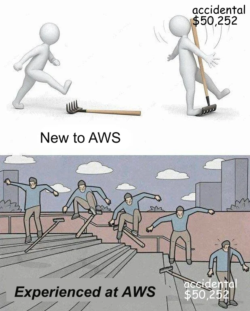
But despite these issues, AWS gives you many options for you to set up that allows you to delay/prevent these charges. It just requires spending the time to gain knowledge in these services first before thoughtlessly setting up something and hoping for the best. As Uncle Ben once famously said “With great power comes great responsibility”
AWS Amplify
AWS Amplify is one of the newer services offered by AWS. It is fully serverless and offers everything you would need to host basic web and mobile apps. It gives you the ability to enable firewalls, headers, cache, monitoring, etc. all the the click of a button. But that comes with downsides as well
There isn’t much to say about Amplify, you can have no knowledge of back-end or DevOps experience and have a site up in under a minute. You can deploy your app straight from most Git providors (Github, Bitbucket, CodeCommit, GitLab), from an S3 bucket, or even from a .zip file.
Amplify pricing
Compared to the S3 hosting option, Amplify is vastly more expensive. But overall still isn’t the worst when it comes to pricing.
If hosting a basic static site, you would probably end up paying around $2 - $5 per month. which isn’t bad at all for a serverlessly hosted site. But when comparing it to S3, which for the same price would be only a few cents. Going this route typically isn’t worth it unless you really just don’t care about the charges.
Conclusion
Unless you are building a web-app or a site that will reach thousands of customers minimum. S3 hosting with CloudFront is the way to go. Even though deploying with Amplify is an absolute breeze compared to S3.
In the end it really depends on what you value more. Less setup and more expensive, or slightly more setup and less expensive.